

-
1. 起步
-
2. Git 基礎
-
3. Git 分支
-
4. 伺服器上的 Git
- 4.1 協議
- 4.2 在伺服器上部署 Git
- 4.3 生成 SSH 公鑰
- 4.4 架設伺服器
- 4.5 Git Daemon
- 4.6 Smart HTTP
- 4.7 GitWeb
- 4.8 GitLab
- 4.9 第三方託管服務
- 4.10 小結
-
5. 分散式 Git
-
A1. 附錄 A: Git 在其他環境
- A1.1 圖形介面
- A1.2 Visual Studio 中的 Git
- A1.3 Visual Studio Code 中的 Git
- A1.4 IntelliJ / PyCharm / WebStorm / PhpStorm / RubyMine 中的 Git
- A1.5 Sublime Text 中的 Git
- A1.6 Bash 中的 Git
- A1.7 Zsh 中的 Git
- A1.8 PowerShell 中的 Git
- A1.9 小結
-
A2. 附錄 B: 在應用程式中嵌入 Git
-
A3. 附錄 C: Git 命令
7.9 Git 工具 - Rerere
Rerere
git rerere 功能有點像一個隱藏的功能。它的名字是“reuse recorded resolution”(重用已記錄的解決方案)的縮寫,顧名思義,它允許你要求 Git 記住你如何解決了一個程式碼塊(hunk)的衝突,以便下次 Git 遇到相同的衝突時,可以自動為你解決它。
在很多情況下,這個功能可能非常有用。文件中提到的一個例子是,當你想要確保一個長期存在的特性分支最終能夠乾淨地合併,但又不希望有大量的中間合併提交弄亂你的提交歷史時。啟用 rerere 後,你可以嘗試偶爾合併,解決衝突,然後撤銷合併。如果你持續這樣做,那麼最終的合併應該會很容易,因為 rerere 可以自動為你完成所有操作。
如果你想保持一個分支的 rebase(變基),這樣每次進行 rebase 時就不必處理相同的 rebase 衝突,也可以使用相同的策略。或者,如果你想將一個已經合併並解決了很多衝突的分支進行 rebase — 你可能不需要再次處理所有相同的衝突。
rerere 的另一個應用場景是,當你偶爾將許多不斷發展的特性分支合併到一個可測試的頭節點時,就像 Git 專案本身經常做的那樣。如果測試失敗,你可以回退合併,然後重新進行合併,排除導致測試失敗的那個特性分支,而無需再次重新解決衝突。
要啟用 rerere 功能,你只需執行此配置設定
$ git config --global rerere.enabled true你也可以透過在特定倉庫中建立 .git/rr-cache 目錄來啟用它,但配置設定更清晰,並且可以為你全域性啟用該功能。
現在讓我們來看一個簡單的例子,類似於我們之前的例子。假設我們有一個名為 hello.rb 的檔案,內容如下
#! /usr/bin/env ruby

def hello
  puts 'hello world'
end
在一個分支中,我們將單詞“hello”改為“hola”,然後在另一個分支中,我們將“world”改為“mundo”,就像之前一樣。
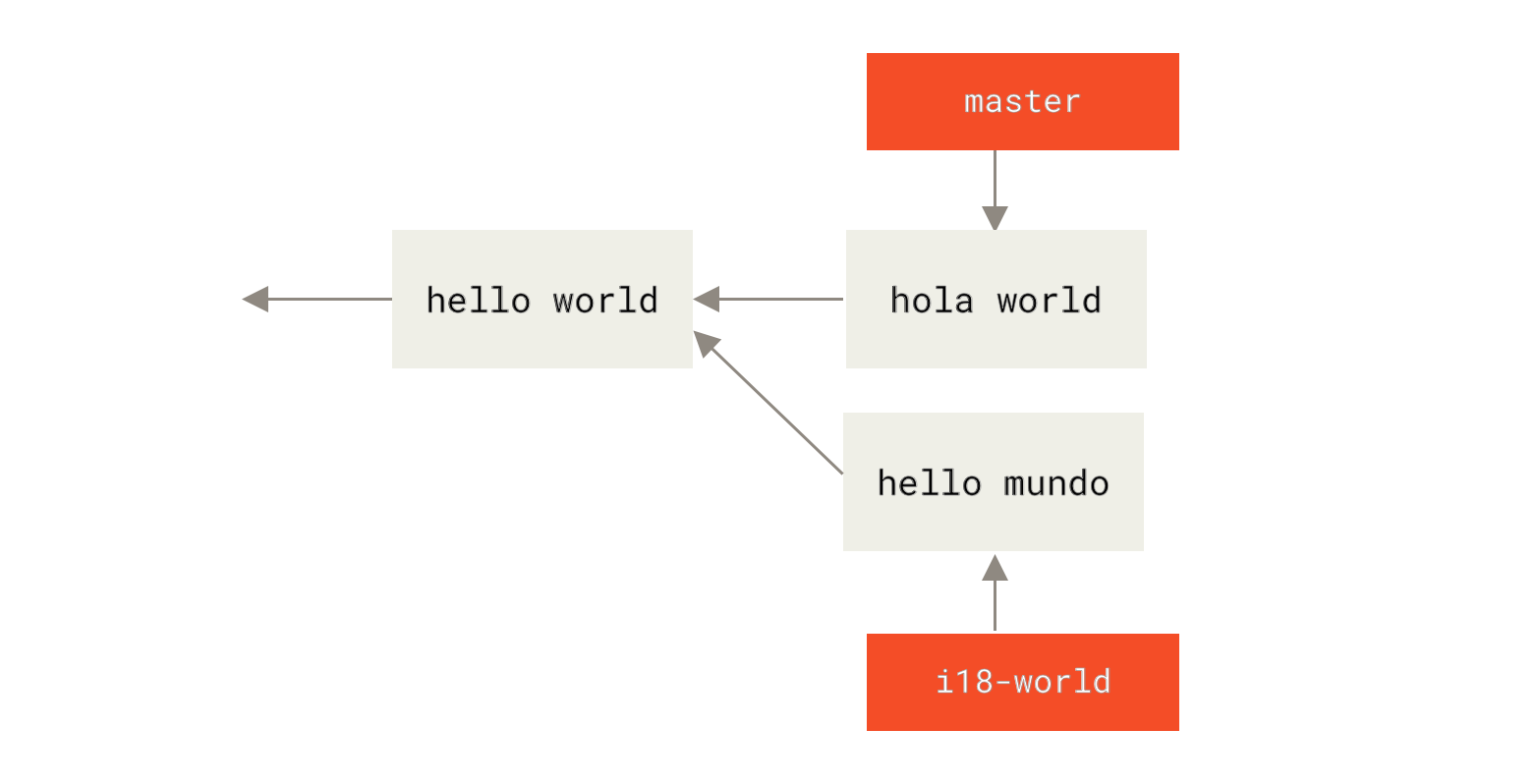
當我們合併這兩個分支時,我們會遇到合併衝突
$ git merge i18n-world
Auto-merging hello.rb
CONFLICT (content): Merge conflict in hello.rb
Recorded preimage for 'hello.rb'
Automatic merge failed; fix conflicts and then commit the result.
你應該會注意到裡面新的一行 Recorded preimage for FILE。除此之外,它應該看起來和普通的合併衝突完全一樣。此時,rerere 可以告訴我們一些事情。通常,你可能會在此刻執行 git status 來檢視哪些檔案發生了衝突
$ git status
# On branch master
# Unmerged paths:
#   (use "git reset HEAD <file>..." to unstage)
#   (use "git add <file>..." to mark resolution)
#
#	both modified:      hello.rb
#然而,git rerere 還會告訴你它已經記錄了哪個檔案的預合併狀態,使用 git rerere status
$ git rerere status
hello.rb
而 git rerere diff 將顯示解決過程的當前狀態 — 你開始用什麼來解決,以及你將其解決成了什麼。
$ git rerere diff
--- a/hello.rb
+++ b/hello.rb
@@ -1,11 +1,11 @@
 #! /usr/bin/env ruby

 def hello
-<<<<<<<
-  puts 'hello mundo'
-=======
+<<<<<<< HEAD
   puts 'hola world'
->>>>>>>
+=======
+  puts 'hello mundo'
+>>>>>>> i18n-world
 end
另外(這與 rerere 本身關係不大),你可以使用 git ls-files -u 來檢視衝突的檔案以及之前的、左側和右側的版本
$ git ls-files -u
100644 39804c942a9c1f2c03dc7c5ebcd7f3e3a6b97519 1	hello.rb
100644 a440db6e8d1fd76ad438a49025a9ad9ce746f581 2	hello.rb
100644 54336ba847c3758ab604876419607e9443848474 3	hello.rb
現在你可以將其解決為 puts 'hola mundo',然後再次執行 git rerere diff 來檢視 rerere 將記住什麼
$ git rerere diff
--- a/hello.rb
+++ b/hello.rb
@@ -1,11 +1,7 @@
 #! /usr/bin/env ruby

 def hello
-<<<<<<<
-  puts 'hello mundo'
-=======
-  puts 'hola world'
->>>>>>>
+  puts 'hola mundo'
 end
這基本上說明,當 Git 在 hello.rb 檔案中遇到一個程式碼塊衝突,其中一邊是“hello mundo”,另一邊是“hola world”,它將將其解決為“hola mundo”。
現在我們可以將其標記為已解決並提交
$ git add hello.rb
$ git commit
Recorded resolution for 'hello.rb'.
[master 68e16e5] Merge branch 'i18n'
你可以看到它“Recorded resolution for FILE”(已記錄 FILE 的解決方案)。
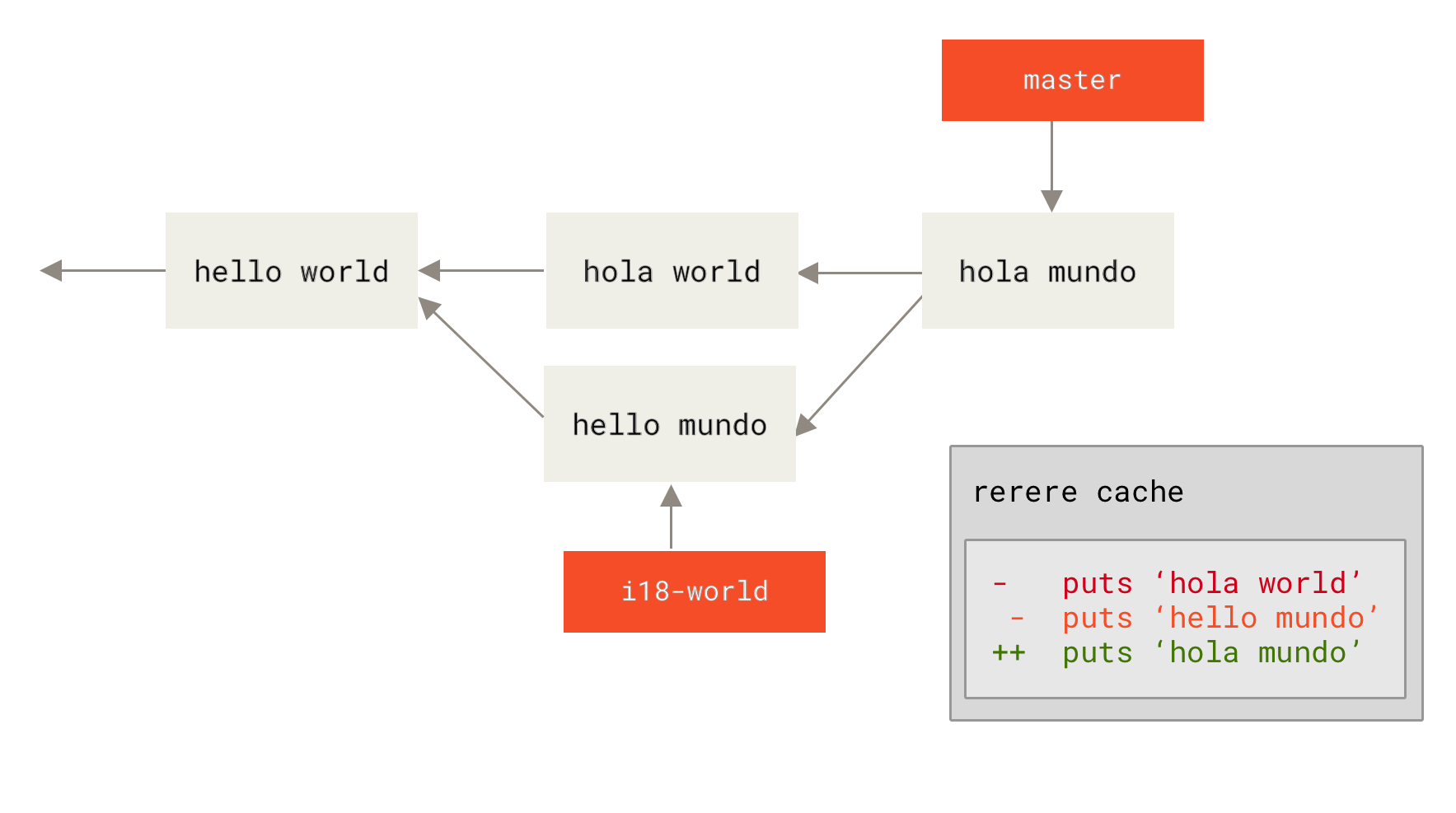
現在,讓我們撤銷那個合併,然後將其 rebase 到我們的 master 分支之上。我們可以使用 git reset 來回退分支,正如我們在 Reset 揭秘 中看到的。
$ git reset --hard HEAD^
HEAD is now at ad63f15 i18n the hello
我們的合併已經撤銷。現在讓我們 rebase 特性分支。
$ git checkout i18n-world
Switched to branch 'i18n-world'

$ git rebase master
First, rewinding head to replay your work on top of it...
Applying: i18n one word
Using index info to reconstruct a base tree...
Falling back to patching base and 3-way merge...
Auto-merging hello.rb
CONFLICT (content): Merge conflict in hello.rb
Resolved 'hello.rb' using previous resolution.
Failed to merge in the changes.
Patch failed at 0001 i18n one word
現在,我們遇到了預期的相同的合併衝突,但請注意 Resolved FILE using previous resolution(使用之前的解決方案已解決 FILE)這一行。如果我們檢視檔案,會發現它已經被解決了,裡面沒有合併衝突標記。
#! /usr/bin/env ruby

def hello
  puts 'hola mundo'
end另外,git diff 會顯示它如何自動重新解決
$ git diff
diff --cc hello.rb
index a440db6,54336ba..0000000
--- a/hello.rb
+++ b/hello.rb
@@@ -1,7 -1,7 +1,7 @@@
  #! /usr/bin/env ruby

  def hello
-   puts 'hola world'
 -  puts 'hello mundo'
++  puts 'hola mundo'
  end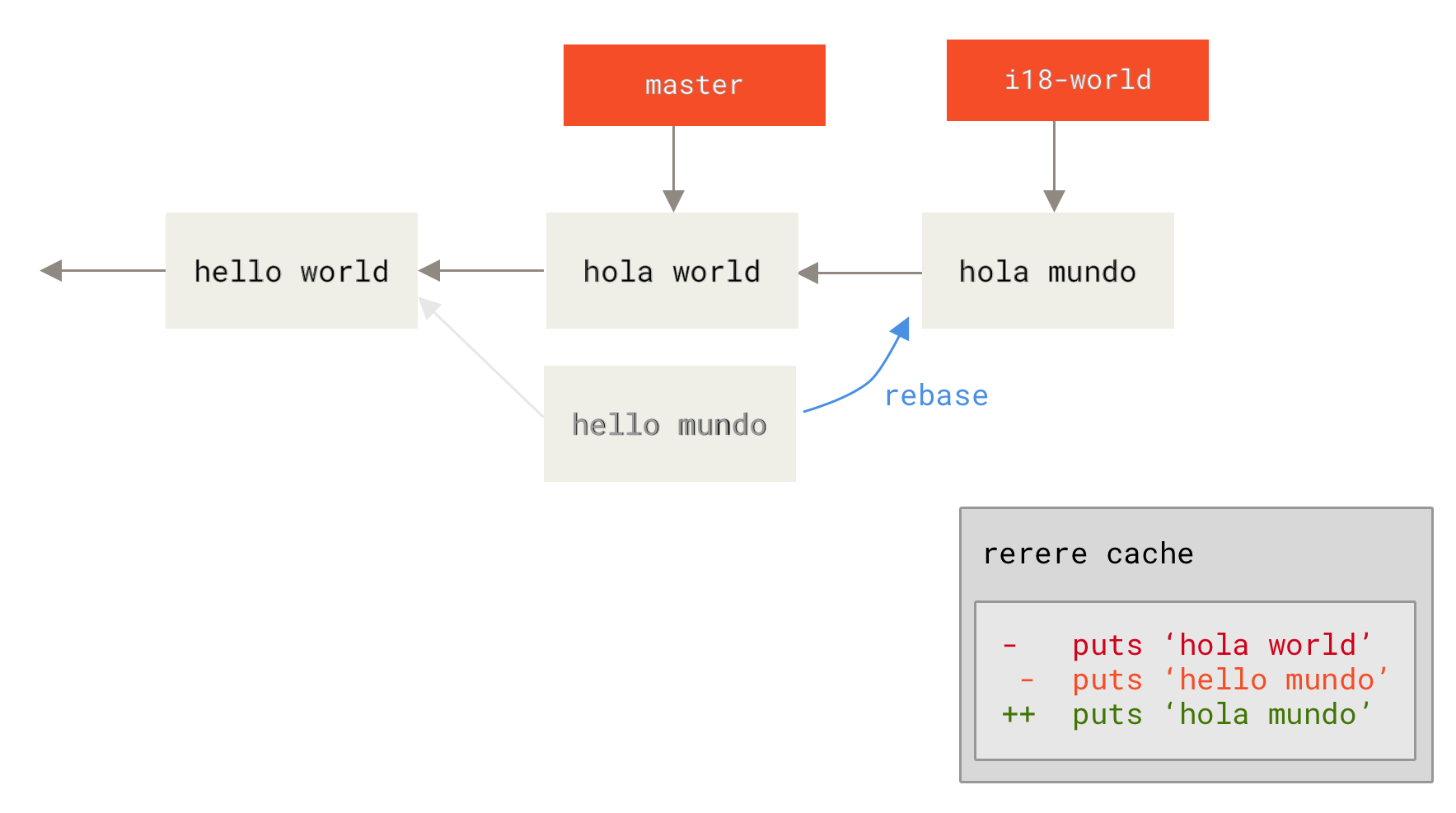
你也可以使用 git checkout 來重新建立衝突的檔案狀態
$ git checkout --conflict=merge hello.rb
$ cat hello.rb
#! /usr/bin/env ruby

def hello
<<<<<<< ours
  puts 'hola world'
=======
  puts 'hello mundo'
>>>>>>> theirs
end
我們在 高階合併 中看到過一個例子。但現在,讓我們透過再次執行 git rerere 來重新解決它
$ git rerere
Resolved 'hello.rb' using previous resolution.
$ cat hello.rb
#! /usr/bin/env ruby

def hello
  puts 'hola mundo'
end
我們已使用 rerere 快取的解決方案自動重新解決了該檔案。現在你可以將其新增到暫存區並繼續 rebase 以完成它。
$ git add hello.rb
$ git rebase --continue
Applying: i18n one word
因此,如果你進行大量的重新合併,或者想在不產生大量合併提交的情況下讓特性分支保持與 master 分支同步,或者你經常進行 rebase,你可以啟用 rerere 來讓你的工作更輕鬆一些。